Job templates and hiring
Start from a developer, lead, devops, advisor, sales or content template and make it yours. Hire into a running office; your comments and order stay as you wrote them.
Open source · MIT · v0 pre-release
You are the CEO. Your employees are the AI sessions you already use in Claude Code, Codex or Cursor. Work moves through sign-offs, nothing passes without proof, and payroll reads what each employee really used.
Employees are the AI sessions you already pay for. No new service, no keys handed over, no cloud: everything is files in your project.
Code Desks never calls a model. It hires, briefs and starts your existing sessions, hands work between them and keeps their payroll.
Payroll reports what each employee actually used, per cycle, against a budget you set. It never guesses a price.
The north star
Offices you can start from
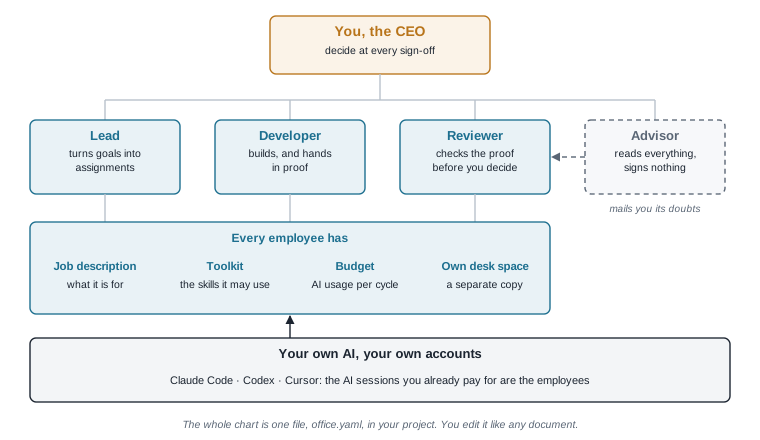
A lead turns your goals into assignments. A developer builds and hands in tests and a read-back of what shipped. An advisor reads everything, signs nothing, and mails you what it doubts.
These three sign-offs come out of the box.
Wire your team
01
Needs Python 3.11 or newer, uv, tmux, and Claude Code, Codex or Cursor.
02
Paste the prompt it prints into the AI you already use. It writes your office file.
03
The mail gets wired once. Then every employee opens in its own window, plus one for you.
How the office works
01 / 03
office.yaml is your org chart: the employees, the sign-offs, the assignments and the first cycle. You read it and edit it like any document, and it lives in your project.
Start from a job template (developer, lead, devops, advisor, sales, content) and make it yours, or describe your team in a sentence and let the AI you already use write the file. Each employee gets a job description, a toolkit, a budget and its own desk space.
02 / 03
An assignment is one piece of work owned by one employee. It passes the sign-offs in order toward a deadline. Every sign-off has two halves: you decide, and the employee hands in proof. It passes only when both halves are in.
scope
You decide
scope · priority
Employee proves
estimate · risks
ready
proof firstYou decide
verdict
Employee proves
tests passing · proof
shipped
proof firstYou decide
acceptance
Employee proves
read-back · receipt
03 / 03
Any hand-in can carry an automatic check: tests, a linter, a signature check. The check is yours, and the proof has to pass it before it counts.
A refusal writes nothing. What passes is pinned by its fingerprint, so a change after the fact is caught when the checks run again.
Everything an office needs
Start from a developer, lead, devops, advisor, sales or content template and make it yours. Hire into a running office; your comments and order stay as you wrote them.
An employee who signs nothing. It reads everything and mails you what it doubts, so a doubt sits beside the decision it is about.
Each employee sees only the skills you give it and works in its own copy of the project, so two employees never trip over each other.
Notes between employees on any AI tool, and to you. Briefings hand an employee only the files you name, with a deny list for terms no brief may carry.
A command the proof has to pass before it is accepted. Later, re-run every accepted check and catch proof that changed after the fact.
Read the real system instead of trusting a hand-in. A sign-off stays true only while the reading holds; when it stops, a warning light comes on.
Stalled work, unread mail, an employee over budget, a live check that stopped holding, sessions on nobody’s payroll. Each one names what clears it.
Chair a round-table of your employees, then approve the minutes as actions. Rehearse a failure on paper and leave one new safeguard behind.
What each employee actually used, per cycle, against the budget you set. Read from the logs your AI tools already keep. Tokens, never guessed money.
Know what a team will cost before it starts, from this folder’s own history or a plan you name, with the weekly range beside the mean.
One self-contained page that draws the whole office in 3D: you, the employees, the checks, and every assignment as a lane through time.
Already running AI sessions in a repo? Code Desks proposes employees from the names of the sessions it already has, and writes the office somewhere else.
At your desk
Who owes what on every assignment. Decide your half and the assignment moves on.
AI tools
Unread mail arrives as extra context at the start of the next turn, through a hook scoped to your project.
Payroll reads its usage from the logs it already writes.
Mail is pushed to a session named after the employee. Otherwise it waits for the employee to read it, which its job description asks for every turn.
Payroll reads its usage from the logs it already writes.
Unread mail arrives at the start of the next turn in Cursor’s interactive terminal session, so keep Cursor employees in their window.
Sessions are counted to an employee; Cursor keeps no usage to read.
Questions
Never. It hires, briefs and starts the AI sessions you already use, hands work between them and keeps their payroll. Warning lights, payroll and checks are worked out from files, not from asking a model.
No. Everything is files in your project: office.yaml, the work board, mail and receipts. Nothing runs when you are not running it. Close the terminal and nothing is lost; the work board is on disk.
Code Desks is free and MIT licensed. Your employees run on the AI plans you already pay for, and payroll shows what each one used against the budget you set.
So anyone can read their AI team like an org chart. The office file and the commands keep short names, so nothing you have already written breaks.
The proof has to pass the check you wrote, and a refusal writes nothing. Accepted files are pinned by their sha256, the same file cannot back two hand-offs, and desk verify re-checks everything later. A check proves what its command proves, and no more: a signature check proves who sealed the proof and that it has not changed since. It does not prove the work was right. That decision stays yours.
It is a v0 pre-release. Next on the roadmap: signed receipts at every turn end through a shared proof core, the work board exported as a view and never the source, and one full cycle of the office run on itself before anything is called 0.1.
Free and open source under the MIT license. Your AI, your accounts, your files.